
For Shopify purchase orders
Send suppliers a clean spreadsheet, not a screenshot.
Pursheet exports the purchase orders you already keep in Shopify as CSV or XLSX files, with one row per line item.
Install Pursheet from the Shopify App Store, then open it from your Shopify admin.
What it does
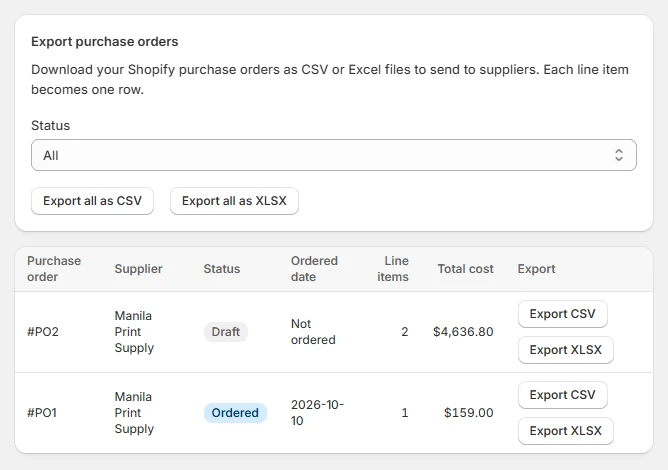
One click per purchase order
Every purchase order in your admin gets Export CSV and Export XLSX buttons.
Export all at once
Pick All, Draft or Ordered and download every matching purchase order in one file.
Read-only by design
Pursheet never changes your purchase orders. It only reads what it exports.
What your supplier gets
The same 13 columns in every file, in this order. Numbers stay numbers, so totals add up in any spreadsheet.
| PO Number | Supplier | Status | Ordered Date | Product | Variant | SKU | Supplier SKU | Quantity | Unit Cost | Tax % | Line Total | Currency |
|---|---|---|---|---|---|---|---|---|---|---|---|---|
| #PO2 | Manila Print Supply | Ordered | 2026-10-10 | Snowboard: Liquid | 156 cm | SB-LIQ | MPS-1042 | 20 | 12.00 | 12.00% | 268.80 | USD |
| #PO2 | Manila Print Supply | Ordered | 2026-10-10 | Snowboard: Oxygen | 162 cm | SB-OXY | MPS-1043 | 30 | 130.00 | 12.00% | 4,368.00 | USD |
How it works
- Open Pursheet from your Shopify admin. Your purchase orders are listed newest first.
- Export one purchase order, or filter by status and export all of them.
- Send the file to your supplier. It opens in Excel, Google Sheets and most supplier systems.